
On this page0
My team module can be accessed through a quick access menu or using menulink in the left-side navigation menu.
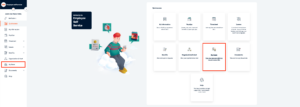
In my team users who are managers can see their team and assign substitutions for requests modules, as well as see history of past substitutions. Let’s say the manager is going on a vacation and wants someone else to approve employees leave requests then this can be done from my team module.
NB! Managers can start assigning subordinates once they have received at least 1 request from any employees. Subordinate’s status needs to be active in order to appear in list.
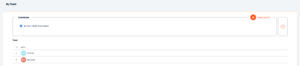
Assigning approval rights
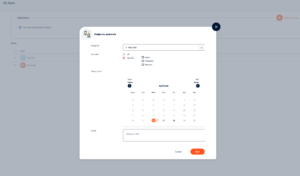
By clicking on ‘Assign approval’ button modal opens up from where it is possible to:
- Select substitute
- Select modules you want to give substitution for:
- All request modules
- Leave
- Requests – Benefits, Expense
- Timesheet
- Use date picker to move between months
- Select dates of substitution
- Add notes if necessary – if note is added then substitute gets email about substitution
After substitution is created it is displayed in the listing like this:

Now all the requests in benefits, leaves and timesheets submitted between these dates will be sent for original reviewer and substitute as well.
Substitute will be able to approve/reject requests.
Your response has been submitted — it helps us make these pages better.