
On this page0
What it does
Lets a payroll admin remove specific employees from the current continuous payroll run without affecting the rest, and optionally move them into a separate off-cycle run so they can be paid on a different schedule or after corrections are made. The Gross-to-Net screen gains an Included / Excluded toggle to review either set, and excluding is guarded by a confirmation step to prevent accidental removal.
How to use
- Open the continuous payroll run (Payroll > Open > select the run).
- Go to the employee list / Gross-to-Net view.
- Select one or more employees using the checkboxes.
- Click Exclude.
- In the confirmation modal, review the employees to be excluded and confirm.
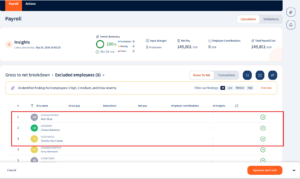
- The selected employees are removed from the current run. Use the Included / Excluded toggle on Gross-to-Net to review each set.


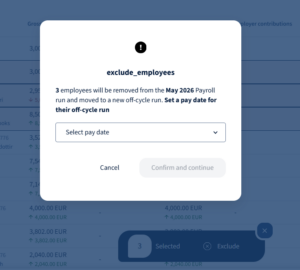
Workflow – Exclude to off-cycle (end to end)
- Identify employees who should not be paid in the main run (Termination payouts or full and final settlements).
- Select those employees on the run and choose Exclude.
- In the confirmation, choose the off-cycle option – the system creates (or adds them to) an off-cycle run scoped to just those employees.
- Complete and approve the main run without them.
- Process the off-cycle run on its own timeline (Add/remove inputs > review Gross-to-Net > approve).
- Both runs calculate and report independently; the excluded employees are paid from the off-cycle run.
- Regular run lists out excluded employees so admin has clear visibility on who got excluded from the main payroll run
Notes
- Only eligible employees can be excluded; ineligible ones are blocked/greyed with a reason.
- Inactive configurations are filtered out of the exclude selection.
Was this page helpful?
Thanks for your feedback.
Your response has been submitted — it helps us make these pages better.