
On this page0
1. Overview
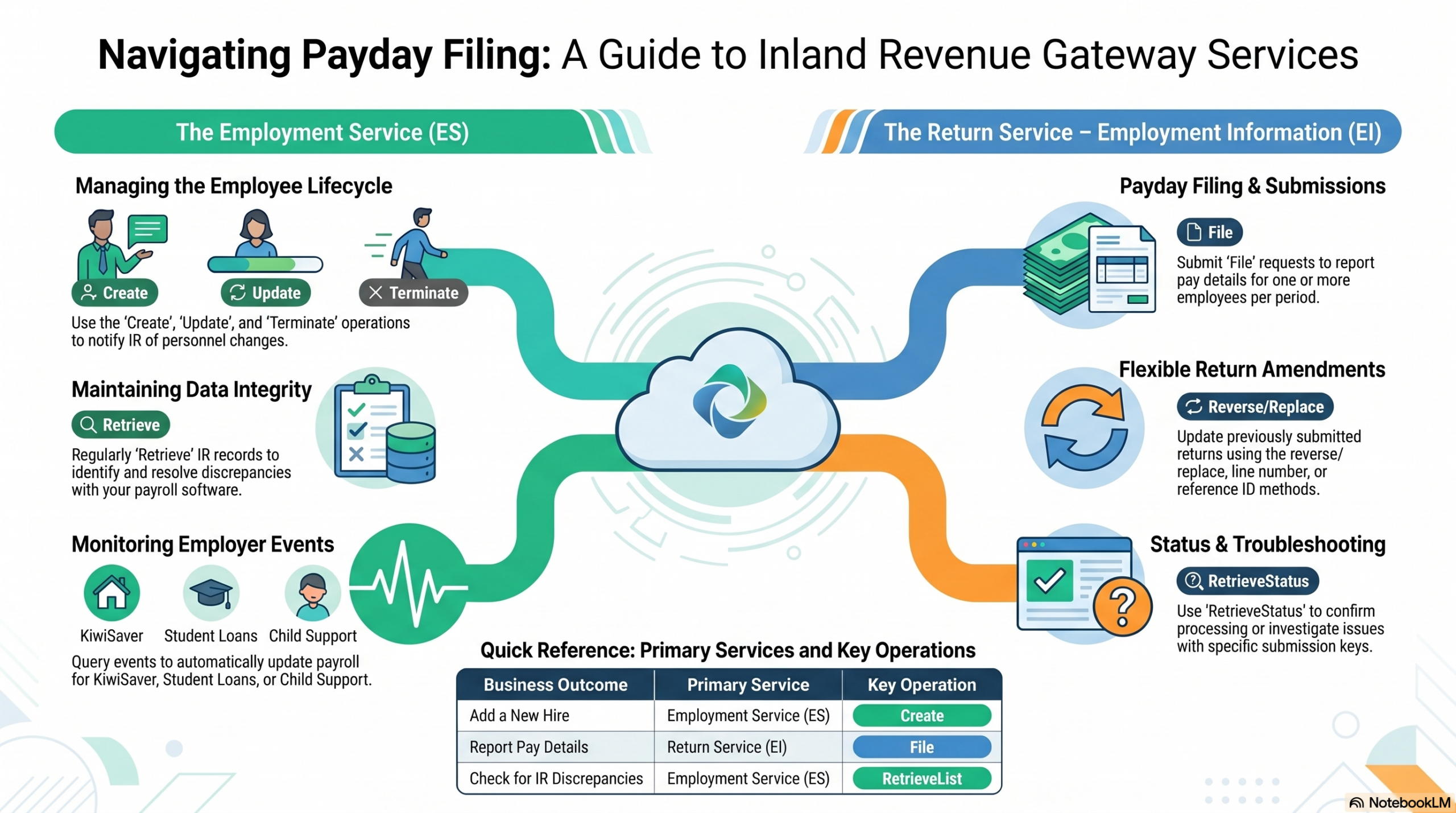
Inland Revenue New Zealand (IR) provides a set of digital services that let approved payroll and HR software products communicate directly with IR on behalf of employers. HRBlizz is fully integrated with these services, which means you can manage employee records and submit payroll returns without ever leaving the application.
| Service | What it does | Also known as |
|---|---|---|
| Employment Service (ES) | Creates and maintains employee records; delivers employer event notifications from IR. | ES |
| Return Service – Employment Information (EI) | Submits and retrieves payday filing returns (Employment Information returns). Also supports checking return status, retrieving pre-populated data, and amending previously filed returns. | EI, payday returns |
Together these services support the complete payday filing lifecycle: registering employees, submitting pay-run data, keeping records up to date, and receiving notifications from IR about changes affecting deductions and KiwiSaver.
Note: Linking or de-linking user roles and rights must still be done directly through Inland Revenue’s online services (myIR). HRBlizz cannot perform this action on your behalf and only acts like recognised by IR SaaS software.
2. Key Concepts & Terminology
| Term | Meaning |
|---|---|
| Employer IRD Number | The nine-digit Inland Revenue number that identifies the employer’s PAYE account. Eight-digit numbers must be padded with a leading zero (e.g. 012345678). |
| Employee IRD Number | The employee’s personal nine-digit IRD number. If an employee does not yet have one, enter all zeros. |
| EI Return / Payday Return | The Employment Information return submitted to IR on or shortly after each payday. Contains pay details for every employee paid in that pay run. |
| Submission Key | A unique reference number that IR assigns to each EI return you file. Keep this reference – you will need it to amend, check the status of, or retrieve a specific return later. |
| Reference ID | A unique identifier that your payroll system creates for each employee line item within an EI return. It is required on every submission and is the primary way to identify and amend individual lines. |
| Nil Return | An EI return submitted for a pay period in which no employees were paid. A nil return must be explicitly flagged as such; you cannot submit a return with no employee lines without setting the nil return indicator to true. |
| Employer Event | A notification sent from IR to your payroll system, alerting you to a required change (e.g. a new student loan deduction rate, a KiwiSaver change, a child support deduction update). |
| Employment Relationship | The active link between an employer account and an employee record held at IR. It is created when you submit new employee details, and ended when you terminate the employee. |
| EMS Name / Employee Name on EI Line | The name that appears on the EI return for this employee. This can differ from the employee’s legal name and can be up to 255 characters. |
| KS1 Form | The KiwiSaver opt-in form. Submitting a Create request with the appropriate KiwiSaver eligibility fields is the electronic equivalent of lodging a KS1. |
| KS10 Form | The KiwiSaver opt-out form. Submitting an Update request with optedOut = true is the electronic equivalent of lodging a KS10. |
| Payday Filing | The legal requirement to report employee pay information to IR on or shortly after each payday, rather than monthly. An employer cannot commence payday filing part-way through a month — payday filing must start with the very first payday in the month. |
3. Global Pre-Conditions
The following conditions must be met before any of the operations described in this guide will work:
- You (or the person acting on the employer’s behalf) are authenticated and authorised in HRBlizz with the required level of access. HRBlizz uses Inland Revenue’s secure login (OAuth2 via myIR credentials). Your access level in HRBlizz mirrors your access level in myIR — if you cannot perform an action in myIR, you will also be unable to perform it through HRBlizz.
- The employer is enrolled for the ‘Employment Activities’ service with Inland Revenue.
- The employer is registered for PAYE.
- Requests can only be submitted for one employer IRD number at a time.
- Most employee-level requests can only be submitted for one employee at a time.
Access levels matter: If a myIR user does not have permission to file a return online, they will not be able to file a return through HRBlizz either. Staff access is governed by the same delegated permissions as myIR.
4. Operations Summary
| # | Business Goal | Service Used | Operation |
|---|---|---|---|
| 1 | Register a new employee with IR | Employment Service | Create |
| 2 | Update an existing employee’s details | Employment Service | Update |
| 3 | Record that an employee has left | Employment Service | Terminate |
| 4 | Retrieve employee records held at IR | Employment Service | RetrieveList |
| 5 | Submit a payday return | Return Service – EI | File |
| 6 | Correct a previously submitted payday return | Return Service – EI | File (amendment) |
| 7 | Check if a payday return was accepted | Return Service – EI | RetrieveStatus |
| 8 | Download the contents of a payday return | Return Service – EI | RetrieveReturn |
| 9 | Retrieve IR notifications about employee changes | Employment Service | Event |
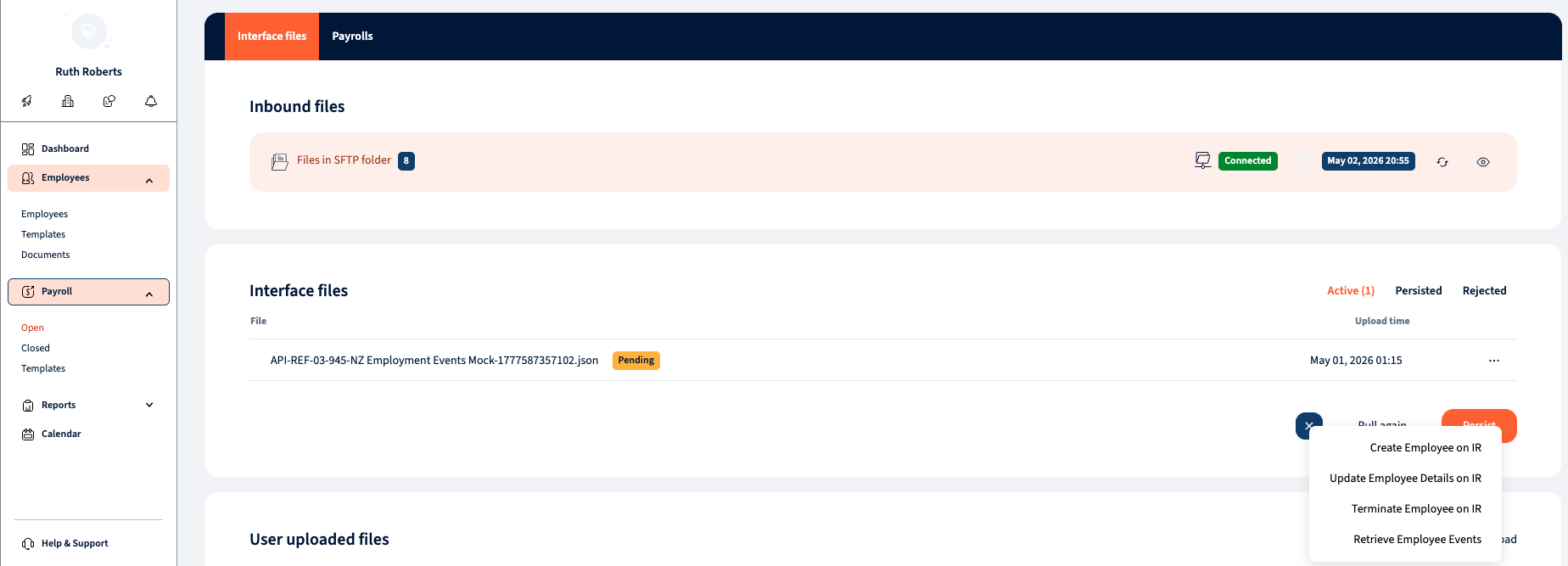
The list of Employment Service operation triggers is available in the PAC Interface files. Before configuring any automations for the listed operations, we strongly recommend using the manual trigger approach first. This will help you familiarise yourself with the business process, the sequence of events, the order in which the operations are performed, and possible outcomes.
5. Use Case 1 – Create New Employee Details
Goal: Register a newly started employee with Inland Revenue, establishing the employer–employee relationship, and optionally enrol them in KiwiSaver.
When to use this
Use this whenever a new employee starts employment. You must notify IR of the new employee’s details before — or at the same time as — you file their first payday return.
Pre-Conditions
- The global pre-conditions in Section 3 are met.
- The employer has a new employee to register.
- All the needed Fields are populated on the Employee Card in HRBlizz
What Information Is Required
| Field | Required? | Notes |
|---|---|---|
| Employee IRD Number | Required | If the employee does not yet have an IRD number, enter all zeros. They must have either a ND or WT tax code when using all-zeros. |
| Employee Full Name | Required | Title (optional), First Name (mandatory), Middle Name (optional), Surname (mandatory for individuals). |
| Employee Name on EI Return Line | Required | The name shown on the payday return for this employee. Up to 255 characters. May differ from legal name. |
| Tax Code(s) | Required | Up to 4 tax codes can be submitted. See the Accepted Tax Codes section. Note: ESS, SLCIR and SLBOR are not valid. |
| Employment Start Date | Required | Format: YYYY-MM-DD (e.g. 2025-06-01). |
| Employment Finish Date | Optional | Only provide if the finish date is already known at start (e.g. fixed-term contract). If provided, a future Terminate request will not be needed. |
| Date of Birth | Optional | Format: YYYY-MM-DD. Cannot be a future date. |
| Employee Address | Optional / Conditional | Required if the employee is opting into KiwiSaver (equivalent of a KS1 form). Supports foreign addresses. |
| Email Address | Optional | |
| Mobile Phone Number | Optional | |
| Day Phone Number | Optional | |
| KiwiSaver Status | Conditional | Required when KiwiSaver Eligibility is set to “New Employee” (NE). See KiwiSaver Reference. |
| KiwiSaver Eligibility | Optional | Combined with KiwiSaver Status, this determines opt-in (KS1 equivalent). See KiwiSaver Reference. |
| Employee Exempt Income | Optional | Reason why part of the employee’s income is exempt from KiwiSaver deductions. See KiwiSaver Reference. |
Step-by-Step Process
- Collect and record the new employee’s details in HRBlizz.
- HRBlizz submits the employee details to IR.
- IR validates the request.
- If validation passes: IR creates the employer–employee relationship and sends a success confirmation.
- If validation fails: IR returns an error code and message. Investigate the error, correct the details, and resubmit (see Response Codes).
- Once the employee record is confirmed, you can proceed to file their first payday return (see Use Case 5).
Post-Conditions
- A new employer–employee relationship is established in IR’s systems.
- The employee is ready to be included in payday filing returns.
Special Rule – Employee Who Wants to Opt Out of KiwiSaver Immediately
If a new employee meets the legal requirements to opt out of KiwiSaver and wants to do so before you have notified IR of their employment, you must:
- Submit the Create request (to register the employee).
- Then submit an Update request (see Use Case 2) including the opt-out fields: Opted Out, Employee Bank Account Number, Account Holder Name, and Opted Out Signature Date.
Important: There may be a short delay between the Create and Update requests processing. If the Update request is sent too quickly after the Create, IR may return an error indicating the Create has not yet been processed. Simply wait a moment and resubmit the Update.
Common Errors
| Code | Meaning & What to Do |
|---|---|
| 103 | The employer IRD number provided is invalid. Check and correct the employer IRD number. |
| 106 | A relationship between this employer account and the employee IRD number already exists. The employee may already be registered. Check existing records before submitting again. |
| 108 | One of the tax codes provided is not valid. Check the accepted tax codes list. |
| 121 | The employee IRD number is not valid. Verify the employee’s IRD number. |
| 130 | The KiwiSaver Status code provided is not valid. Use one of: AK, OK, NK, CT, AE. |
| 136 | The KiwiSaver Eligibility code provided is not valid. Use one of: NE, EE, EA. |
| 146 | A KiwiSaver Status is required when KiwiSaver Eligibility “NE” (New Employee) is provided. |
6. Use Case 2 – Update Employee Details
Goal: Update an active employee’s details held at Inland Revenue — such as a name change, new address, updated tax code, or a KiwiSaver opt-in or opt-out.
When to Use This
Use this whenever any of an employee’s details change after their initial registration. Common triggers include a change of address, a new tax code, KiwiSaver enrolment, or an employee opting out of KiwiSaver.
⚠️ Critical Warning – Update Replaces All Data
The Update operation completely replaces ALL existing information for the employment relationship. If a field held data previously and you do not include that data in your Update request, the data will be removed.
Example: If an employee’s address was on file and you submit an Update to change their tax code without including their address, the address will be deleted from IR’s records.
Always include all current field values in every Update request, not just the values you are changing.
Practical example: If employee IRD 123-456-789 already has tax code MSL and you need to add STC, your Update must include both MSL and STC.
Pre-Conditions
- The global pre-conditions in Section 3 are met.
- An active (unceased) employment relationship already exists for this employee with this employer.
- All the needed Fields are populated on the Employee Card in HRBlizz
What Information Is Required
| Field | Required? | Notes |
|---|---|---|
| Employee Identifier | Required | Used to find the existing record. Must include Employee IRD Number and Employee Name on EI Line (these two must match IR’s records exactly). Date of Birth and Employment Start Date are optional but help resolve ambiguity. |
| Employee IRD Number (updated) | Required | Include even if unchanged. |
| Employee Full Name | Required | Title (optional), First Name (mandatory), Middle Name (optional), Surname (mandatory for individuals). |
| Employee Name on EI Return Line | Required | Up to 255 characters. |
| Employment Start Date | Required | Must be included in the update body. Format: YYYY-MM-DD. |
| Date of Birth | Optional | Format: YYYY-MM-DD. Cannot be a future date. |
| Tax Code(s) | Optional | Include all tax codes that should apply, not just the new one. Up to 4 codes. Two primary tax codes cannot be submitted for one person. |
| Employee Address | Optional / Conditional | Required when opting in to or out of KiwiSaver. |
| Email Address | Optional | |
| Mobile / Day Phone | Optional | If opting out of KiwiSaver, phone numbers must be valid New Zealand numbers including area code. |
| KiwiSaver Eligibility | Optional | Including this field will trigger a KS1 (opt-in) unless the Opted Out field is set to true, in which case it triggers a KS10 (opt-out). |
| Opted Out | Optional | Set to true to opt the employee out of KiwiSaver (equivalent of submitting a KS10 form). |
| Employee Bank Account Number | Optional | Used for KiwiSaver opt-out only; not mandatory but often provided. |
| Account Holder Name | Optional | Required when a bank account number is provided (and vice versa — you cannot provide one without the other). |
| Opted Out Signature Date | Optional / Conditional | Required when opting out of KiwiSaver. |
| Valid Relationship | Required | Indicates whether this employment relationship is valid. Set to false only if the record was created in error and must be invalidated. |
| Late Opt-Out Reason | Optional | Required if the opt-out is being submitted after the normal window. See KiwiSaver Reference for accepted codes. |
| Other Late Opt-Out Reason | Optional | Free-text explanation when the Late Opt-Out Reason code is “OTHR” (Other). |
Step-by-Step Process
- In HRBlizz, update the employee’s details as required. Ensure all existing data is preserved — not just the changed fields.
- HRBlizz submits the updated details to IR.
- IR validates the request and confirms the existing employment relationship using the Employee Identifier.
- If validation passes: IR updates the employment relationship and confirms success.
- If validation fails: IR returns an error code. Investigate, correct, and resubmit.
Post-Conditions
- IR’s records for this employee are updated with the new information.
- If a KiwiSaver opt-in or opt-out was included, the relevant KiwiSaver form (KS1 or KS10) has been lodged electronically.
Common Errors
| Code | Meaning & What to Do |
|---|---|
| 101 | The details you provided did not match any existing employment relationship. Check that the Employee IRD Number and Employee Name on EI Line exactly match what is held at IR. |
| 109 | Two primary tax codes were submitted for one person. Only one primary tax code is allowed. |
| 110 | KiwiSaver Eligibility should not be included when opting out. |
| 111 / 112 | A bank account and account holder name must always be provided together. You cannot provide one without the other. |
| 113 | An opted-out signature date is required when opting out of KiwiSaver. |
| 132 | The Late Opt-Out Reason code provided is not valid. Use one of: INFO, IRIS, ERIS, EVNT, CRIT, INER, OTHR. |
| 133 | When the Late Opt-Out Reason is “OTHR”, an explanation must also be provided in the Other Late Opt-Out Reason field. |
| 135 | The Opted Out field must be set to true when a Late Opt-Out Reason has been provided. |
7. Use Case 3 – Remove a Departing Employee
Goal: Notify Inland Revenue that an employee has left employment, ending the active employer–employee relationship.
When to Use This
Use this when an employee finishes employment and you know their last working day. The Terminate request records the end date at IR so the employment relationship is marked as ceased.
Tip: If the finish date is already known when you first register the employee (e.g. a fixed-term contract), you can include it in the original Create request. In that case, a separate Terminate request will not be needed.
Pre-Conditions
- The global pre-conditions in Section 3 are met.
- An active employment relationship exists for this employee.
- You have already filed the employee’s final payday return.
- All the needed Fields are populated on the Employee Card in HRBlizz
What Information Is Required
| Field | Required? | Notes |
|---|---|---|
| Employee Identifier – Employee IRD Number | Required | Must match IR’s records. |
| Employee Identifier – Employee Name on EI Line | Required | Must match IR’s records exactly. |
| Employee Identifier – Date of Birth | Optional | Used if provided to help identify the correct record. |
| Employee Identifier – Employment Start Date | Optional | Used if provided to help identify the correct record. |
| Employment Finish Date | Required | The employee’s last day of employment. Format: YYYY-MM-DD. Cannot be before the Employment Start Date. |
Step-by-Step Process
- Record the employee’s finish date in HRBlizz.
- HRBlizz submits the termination details to IR.
- IR validates the request, confirming the employment relationship exists.
- If validation passes: IR marks the employment relationship as ceased and confirms success.
- If validation fails: IR returns an error. Investigate, correct, and resubmit.
Post-Conditions
- The employee is no longer shown as actively employed by this employer in IR’s systems.
- The employee remains visible in the ceased employee list (retrievable via Use Case 4).
Common Errors
| Code | Meaning & What to Do |
|---|---|
| 101 | No matching employment relationship found. Verify the Employee IRD Number and Name on EI Line. |
| 107 | The finish date cannot be before the employment start date. Check both dates. |
| 124 | The start or finish date overlaps with another record for this employee. Review the employment dates. |
8. Use Case 4 – Retrieve Employee Details
Goal: Download employee records held at IR to check for discrepancies between IR’s data and your HRBlizz records.
When to Use This
Use this for periodic reconciliation to ensure the data in HRBlizz matches what IR holds, or to look up a specific employee’s record. If discrepancies are found, follow up with an Update (Use Case 2).
Note: The Retrieve List operation is not available to payroll bureaus. It is available to employers retrieving their own employee data only.
Pre-Conditions
- The global pre-conditions in Section 3 are met.
What You Can Request
| Option | What Is Returned |
|---|---|
| Full list (no employee IRD filter) | Basic details for all current and ceased employees linked to this employer. |
| Single employee (filter by Employee IRD Number) | Basic details for that specific employee only. |
What Is Returned for Each Employee
- Employee IRD Number
- Employee Full Name
- Employee Name on EI Line
- Tax Code(s)
- Date of Birth
- Employment Start Date
- Employment Finish Date (if applicable)
Step-by-Step Process
- In HRBlizz, select whether to retrieve all employees or a specific employee.
- HRBlizz submits the request to IR.
- IR validates the request and returns the matching employee records.
- Review the returned data and compare it with your HRBlizz records.
- For any discrepancies, proceed to Use Case 2 – Update Employee Details to correct IR’s records.
Post-Conditions
- You have the current employee records as held by IR.
- Any discrepancies have been identified for follow-up action.
9. Use Case 5 – Submit an Employment Information Return
Goal: File a payday return with Inland Revenue containing the pay details for all employees paid in a pay run.
When to Use This
After every pay run. You are legally required to submit an Employment Information return on or shortly after each payday. HRBlizz supports this as part of the standard payroll processing workflow.
Pre-Conditions
- The global pre-conditions in Section 3 are met.
- The employer has completed a pay run with new payday information for one or more employees.
- All employees included in the return should already be registered with IR (Use Case 1).
- Payday filing cannot be started part-way through a month — the first return must cover the very first payday of the month.
Important Rules
- Reference ID required: Every employee line in a return must have a unique Reference ID assigned by HRBlizz. This ID is used to identify and amend individual lines if corrections are needed later.
- Multiple returns per payday: More than one EI return can be submitted for the same payday date if needed.
- Nil returns: If a return covers a period where no employees were paid, it must be submitted as a Nil Return. You cannot submit a return with no employee lines without explicitly flagging it as nil.
- Payday date must match filing period: The payday date must fall within the same calendar month as the filing period end date (e.g. a payday of 31 March cannot be filed under the April period).
- Filing period limit: Returns cannot be filed more than two months in advance.
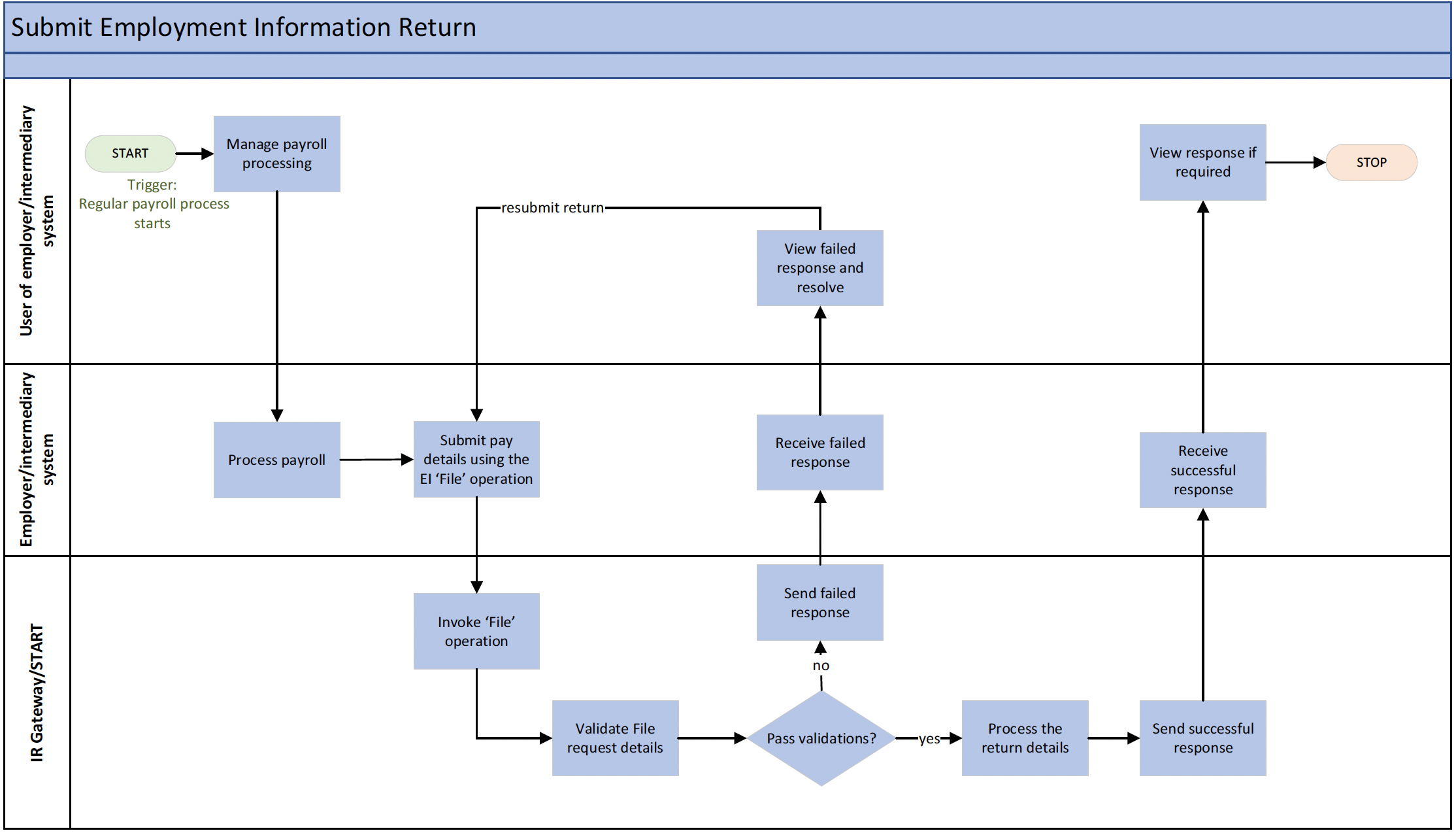
Step-by-Step Process
- Complete the pay run in HRBlizz.
- HRBlizz prepares and submits the Employment Information return to IR for all employees in that pay run.
- IR validates the return.
- If validation passes: IR processes the return and confirms success, returning a unique Submission Key. Record this key — you will need it if you ever need to amend, check the status of, or retrieve this specific return.
- If validation fails: IR returns an error code and message. Investigate, resolve the issue, and resubmit.
The Submission can be linked to any of the Payroll Stages e.g. Payroll Results Review. The Submission Details are visible on PAC – Payroll Outbound Integrations View:

Post-Conditions
- The payday return is filed successfully with IR.
- A Submission Key is recorded in HRBlizz for future reference.
Common Errors
| Code | Meaning & What to Do |
|---|---|
| 134 | An employee IRD number in the return is invalid. Check the employee’s IRD number and correct it. |
| 136 | The return has no employee lines but was not flagged as a Nil Return. If no employees were paid this period, mark the return as a Nil Return before submitting. |
| 137 | A Reference ID is missing for one or more employee lines. Every line must have a unique Reference ID. |
| 160 | A duplicate submission has been detected — a return with the same account, period, payday and data was submitted within the last hour. Wait before resubmitting. |
| 161 | The payday date is not within the required filing period (it must be in the same month as the period end date). |
| 162 | This filing period already has a non-payday return (EMS / IR348) filed. Contact IR if this is unexpected. |
| 163 | The pay period end date is before the pay period start date. Check and correct the pay period dates. |
| 164 | The filing period is too far in the future (maximum two months in advance). |
| 174 | An invalid pay frequency was provided for an employee. See the Pay Frequencies table for accepted values. |
| 175 | Family Tax Credits were included in the return. Only the Ministry of Social Development (MSD) is permitted to use this field. Remove the Family Tax Credits value. |
| 176 | Tax credit for payroll donations exceeds the PAYE/schedular tax deductions for an employee line. Donations credits cannot exceed PAYE deductions. |
| 177 | The total of all deductions (PAYE, KiwiSaver, student loan, child support, etc.) for an employee line exceeds their total earnings. Review the deduction amounts. |
| 178 | Earnings not liable for ACC for an employee line exceed the employee’s gross earnings. Correct the ACC-exempt earnings figure. |
| 179 | KiwiSaver deductions or employer contributions were included for an employee with a WT (withholding tax) tax code. WT employees are not eligible for KiwiSaver deductions through payroll. |
10. Use Case 6 – Update a Previously Submitted EI Return
Goal: Correct or amend a payday return that has already been submitted to IR.
When to Use This
If you discover an error in a previously filed payday return — for example, an incorrect pay amount, wrong tax deduction, or a missing employee — you can submit an amended return to correct it.
Pre-Conditions
- The global pre-conditions in Section 3 are met.
- At least one payday return has already been submitted.
- You have identified data in that return that needs correction.
- The original return was filed no more than four years ago. Returns older than four years are time-barred and cannot be amended.
- The original return has not been manually reversed or transferred by IR (if it has, contact Inland Revenue directly).
Amendment Methods
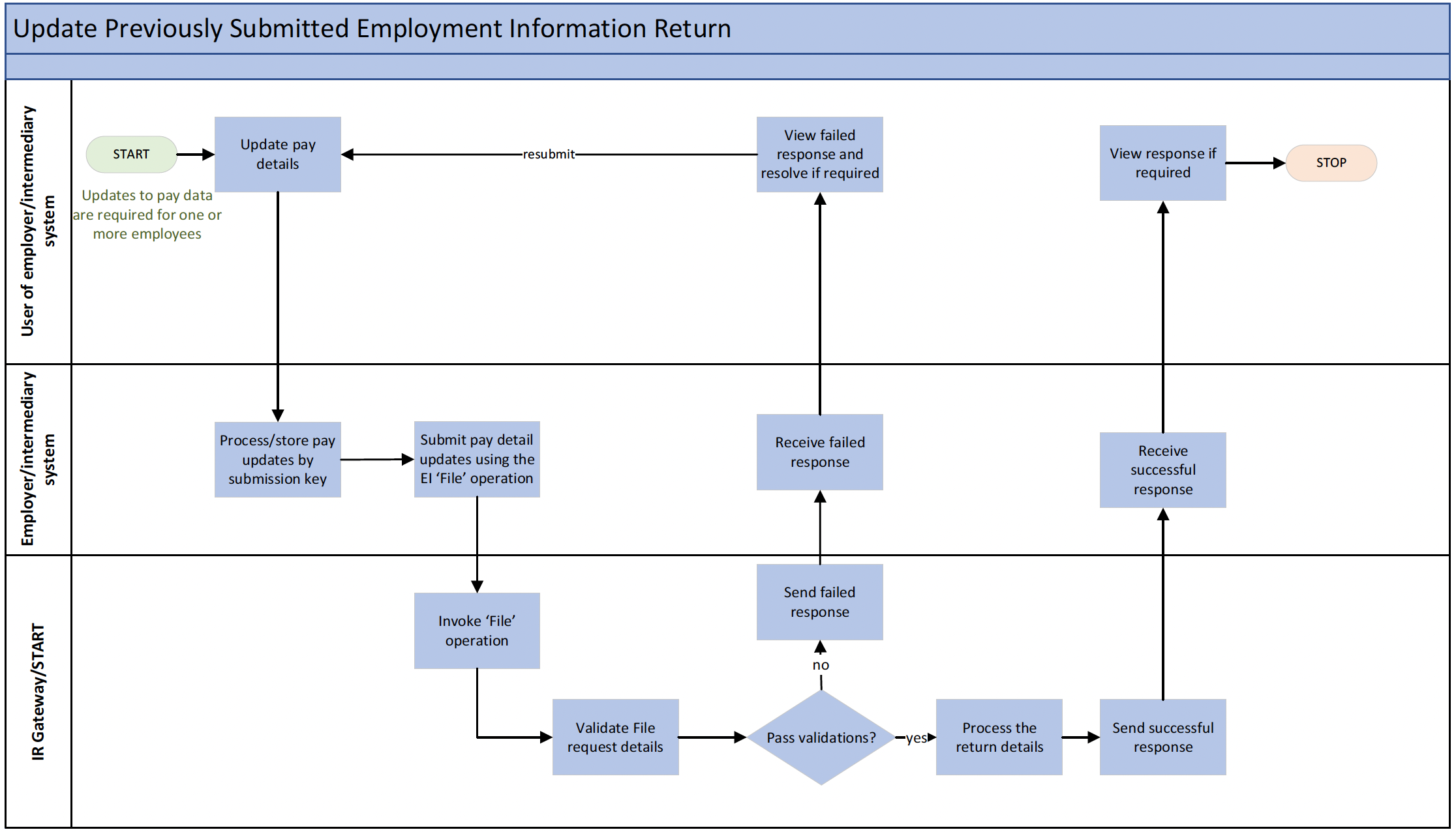
There are two ways to amend a previously filed return. Both require you to have the original Submission Key. HRBlizz will guide you through the appropriate method:
| Method | How It Works | Best Used When |
|---|---|---|
| Reverse/Replace Method | The entire original return is effectively reversed and a new complete return is submitted in its place. All employee lines — amended and unchanged — must be included. Lines from the original return that are not included in the replacement will be reversed (removed). | When many lines need correcting, or you want a clean full replacement of the whole return. |
Step-by-Step Process
- Identify the return that needs amendment using its Submission Key or payday date.
- Create the amendment Report in HRBlizz – on LE HR Fields – Employer Information – change Amendment Return Indicator to “Yes” – Select the Amendment Reason and Add Free Text in a corresponding field. Double-check the Original File Submission Key For Amendment (can be found in the Response from submission, which is going to be amended). N.B. Do not forget to change the Indicator of Amendment to “No” for the next period
- HRBlizz submits the amendment to IR with the reason for the amendment.
- IR validates and processes the amendment, returning a new Submission Key on success.
- If validation fails, investigate the error code, correct the data, and resubmit.
Post-Conditions
- The amended return is on file at IR.
- A new Submission Key is recorded for the amendment.
- The return status will update to “Amended”.
Common Errors
| Code | Meaning & What to Do |
|---|---|
| 107 | A return already exists for this period/payday. Amendments to existing returns must be submitted with the amendment flag set. Ensure you are filing as an amendment, not a new return. |
| 109 | No valid amendment reason was provided. An amendment reason is required (e.g. incorrect amount, calculation error, transposition error, or other). |
| 131 | Two lines in the same submission have the same Reference ID. All Reference IDs within a submission must be unique. |
| 132 | The Reverse/Replace method can only be used when submitting an amendment. You cannot use this method on a first-time filing. |
| 137 | A Reference ID is missing for one or more lines. Every line in an amendment must have a Reference ID. |
| 167 | The return has been manually reversed by IR and cannot be amended. The Submission Key is no longer valid. Contact Inland Revenue if needed. |
| 168 | The return has been manually transferred to another account or period. Contact Inland Revenue (via phone or myIR) if this is incorrect. |
| 169 | The return was originally filed using a different version of the EI form. Amendments and retrievals must use the same EI version as the original submission. |
| 180 | The return is time-barred. The original return was filed more than four years ago and can no longer be amended. |
| 200 | A prior-period adjustment amount on a line exceeds the corresponding gross earnings or PAYE figure for that line. Review and correct the adjustment values. |
11. Use Case 7 – Check the Status of an EI Return
Goal: Confirm whether a payday return has been successfully received and processed by IR, or investigate why a return appears to have an issue.
When to Use This
Use this if you are unsure whether a return was accepted, if you receive an unexpected result, or when troubleshooting a filing issue. Note that once a return has been filed, it can take up to 24 hours for the status to update from “Submitted”.
Pre-Conditions
- The global pre-conditions in Section 3 are met.
- At least one payday return has been submitted.
- You have the Submission Key for the return you want to check.
Step-by-Step Process
- In HRBlizz, select the return you want to check by Submission Key or payday date.
- HRBlizz queries IR for the current status of that return.
- IR responds with the return status and the Submission Key.
- Review the status using the table below. If there is an issue, investigate and take corrective action (e.g. submit an amendment using Use Case 6).
Return Status Descriptions
| Status | What It Means |
|---|---|
| Submitted | The return has been received by IR but has not yet been processed. This is the normal initial status after filing. It can take up to 24 hours to change. |
| Submission received | The return has been received and initial processing has completed. During any co-existence period, the return may be held and forwarded for further processing at end of period. |
| Ontime-received | The return was received on time. |
| Ontime-processing | The return was received on time and is currently being processed. Expected progression through this status takes around 24 hours on business days. |
| Ontime-processed | The return was processed on time successfully. This is the normal final status for a correctly filed return. |
| Late-received | The return was received after the due date. |
| Late-processing | The return was received late and is currently being processed. |
| Late-processed | The return was received late and has now been processed. |
| Processed | The return has been processed. |
| Posted | The return has been posted to the account. |
| Amended | The return has been amended. |
| Expected | IR is expecting a return for this period — one has not yet been filed. |
| Optional | The return is not required to be filed, but the customer may choose to file anyway. |
| New | The return has not yet been processed. |
| Processing | The return is currently being processed. |
| Overdue | The return is overdue — it was not filed by the due date. |
| Under review | The return has been flagged for audit review by IR. |
| Default assessment | IR has issued a default assessment because the return was not filed. Filing an amended return may resolve this. |
| Converted-penalty | The return was not filed and has been converted to a late-file penalty record. |
Post-Conditions
- You have confirmation of whether the return is accepted, pending, or has an issue.
12. Use Case 8 – Retrieve an Employment Information Return
Goal: Download the full contents of a previously submitted payday return from IR, for reconciliation or amendment purposes.
When to Use This
Use this to view exactly what was received by IR for a particular payday, or to review the return before preparing an amendment (Use Case 6).
Pre-Conditions
- The global pre-conditions in Section 3 are met.
- One or more payday returns have been submitted.
Retrieval Options
| Option | What Is Returned |
|---|---|
| By payday date (all returns for that date) | All returns submitted for that payday date, including any amendments. |
| By Submission Key (one specific return) | The exact return associated with that unique Submission Key. |
Step-by-Step Process
- In HRBlizz, select whether to retrieve by payday date or by a specific Submission Key.
- HRBlizz submits the retrieval request to IR.
- IR returns the full return details, including all optional fields that were present.
- Review the data. If amendments are needed, proceed to Use Case 6.
Post-Conditions
- You have a full copy of the return as held by IR.
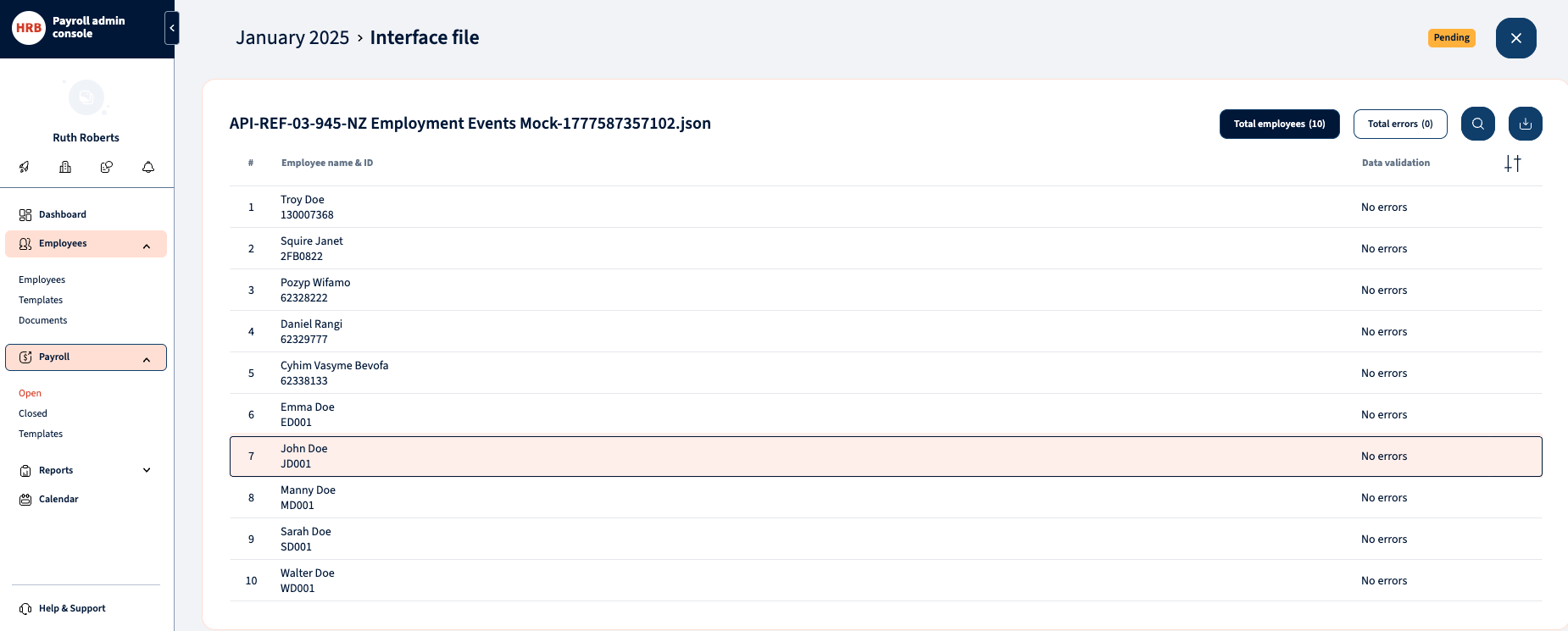
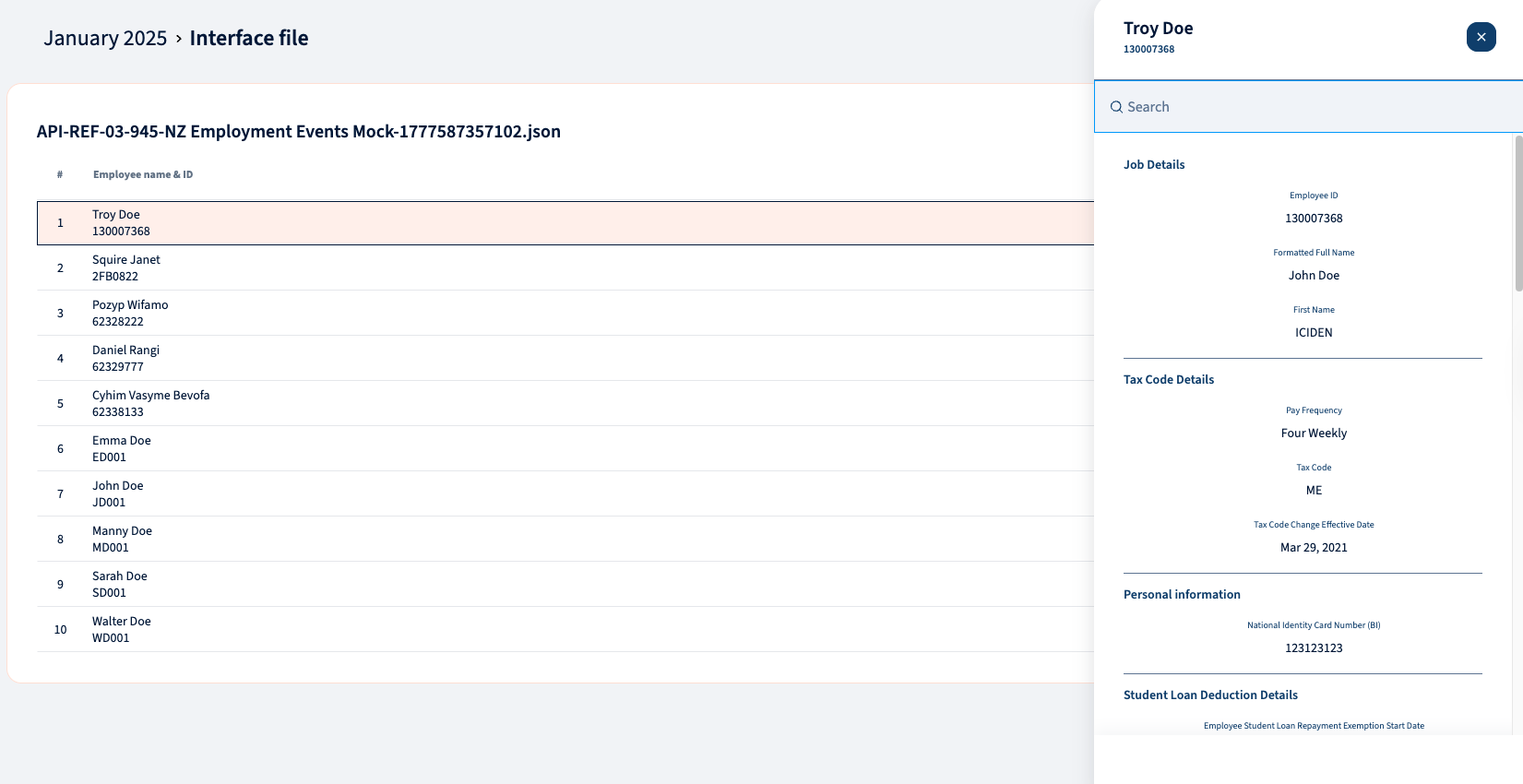
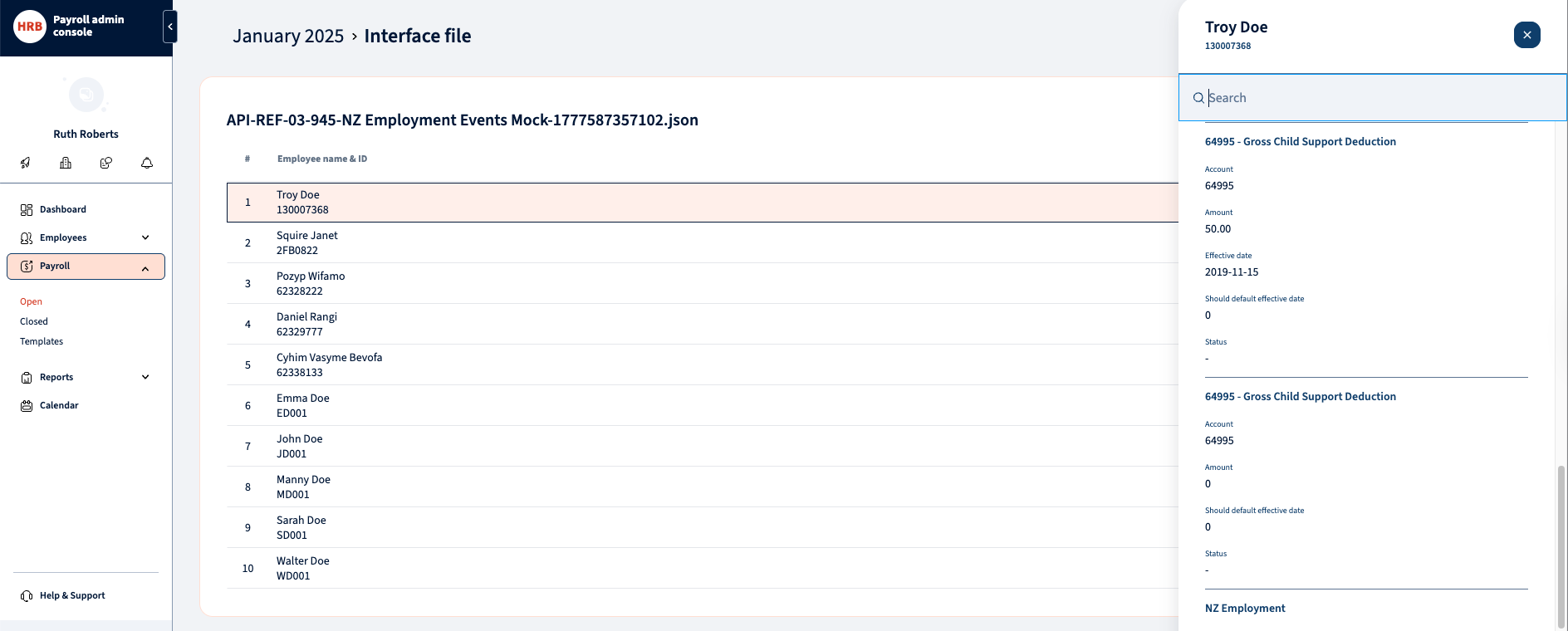
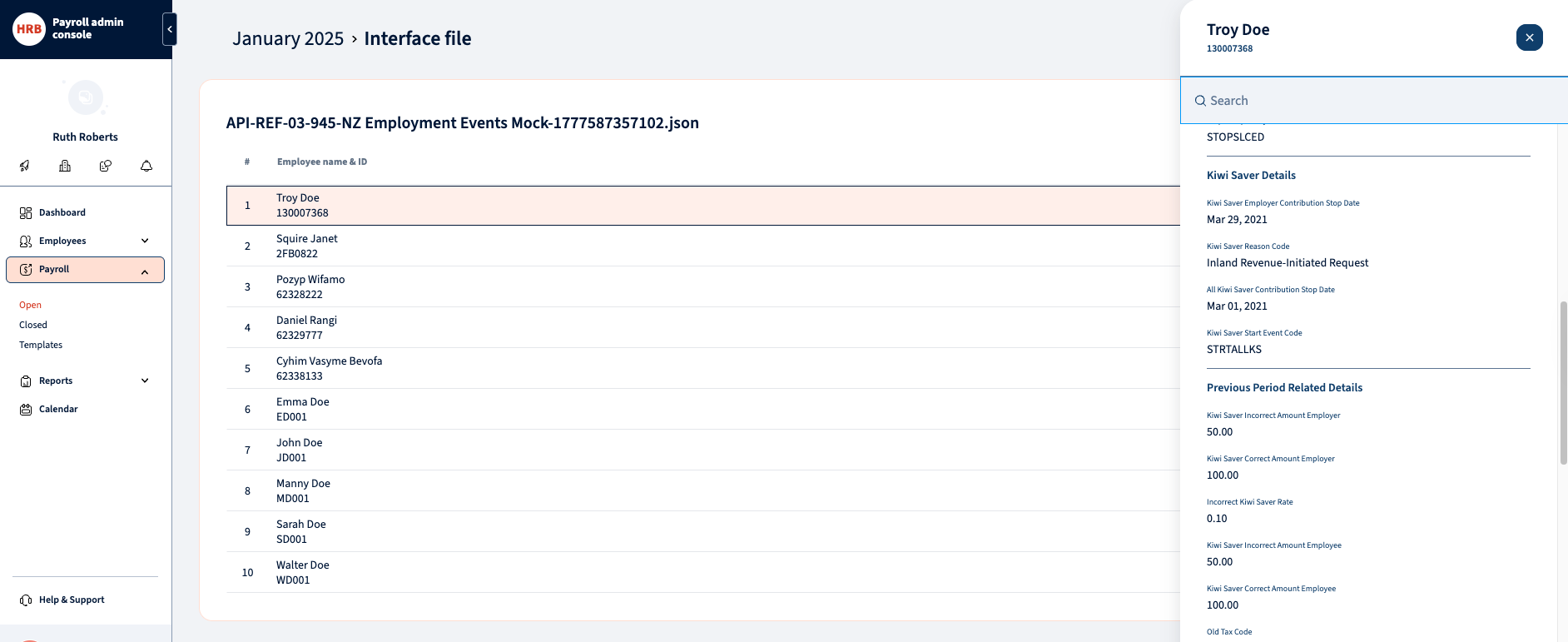
13. Use Case 10 – Retrieve Employer Events
Goal: Retrieve notifications sent by IR that alert you to required changes to an employee’s deductions or KiwiSaver contributions.
What Are Employer Events?
Employer Events are messages generated by IR that inform you of changes that affect how you pay your employees. Examples include:
- A new student loan deduction rate has been set for an employee.
- You need to start or stop making KiwiSaver deductions for an employee.
- A child support deduction has started, changed, or ended for an employee.
- An employee’s tax code needs to change.
- IR has identified that an employee’s deductions are incorrect.
Events are generated as they occur at IR and can apply to Child Support, Student Loans, or KiwiSaver products. HRBlizz can retrieve these events on a scheduled basis or on demand.
Pre-Conditions
- The global pre-conditions in Section 3 are met.
Step-by-Step Process
- In HRBlizz, set the date range and any other filters for the events query.
- HRBlizz submits the query to IR.
- IR returns all events matching the filter criteria.
- Review each event in HRBlizz. Each event tells you what action is required.
- Liaise with the relevant employee if clarification is needed.
- Update the employee’s pay details in HRBlizz as required by the event (e.g. update the tax code, change the student loan deduction rate, start KiwiSaver deductions).
- The updated details will be reflected in future payday returns.
Post-Conditions
- You have retrieved all relevant employer event notifications.
- Employee pay details have been persisted in HRBlizz to reflect the required changes on Employee cards for Payroll calculations and future payday submissions.
Complete List of Event Types
| Event Code | What It Means / What Action Is Required |
|---|---|
| CSDEDC | Child support deduction change. Update the child support deduction amount for this employee, effective from the pay date shown. |
| CSDEDE | Child support deduction end. Stop making child support deductions for this employee from the pay date shown. |
| CSDEDS | Child support deduction start. Begin making child support deductions for this employee from the pay date shown, at the amount provided. |
| ICIDEN | Student loan deductions incorrect. IR has identified that student loan deductions for this employee are incorrect. Review and correct the deductions. |
| INCTAXCHG | Income tax deduction change. Change the standard income tax deduction for this employee from the dates shown. |
| KSCTRINC | Employer KiwiSaver contribution incorrect. Your KiwiSaver employer contribution amount for this employee is wrong. The event includes current and expected amounts. |
| KSDEDINC | Employee KiwiSaver deduction incorrect. The KiwiSaver deduction amount or rate used was incorrect. The event includes current and expected amounts and rates. |
| KSECNOTC | Employer KiwiSaver contributions not compulsory. Your compulsory employer KiwiSaver contributions for this employee are no longer required (general cessation). |
| KSECNOTR | Employer KiwiSaver contributions not compulsory (retirement age). This employee has reached retirement age; compulsory employer KiwiSaver contributions are no longer required. |
| KSECRCHG | KiwiSaver employee deduction rate change. The employee has requested a change to their KiwiSaver contribution rate. Update to the expected deduction rate shown. |
| RDESTART | Stop student loan deductions – repayment exemption. This employee has been granted a repayment deduction exemption. Stop making student loan deductions from the start date and apply the expected tax code. |
| RDRCNL | Reduced deduction rate cancelled. The student loan reduced deduction rate for this employee has been cancelled. Revert to the expected tax code from the start date. |
| RDREND | Reduced deduction rate ending. The employee’s reduced student loan deduction rate is ending soon. You will need to start making normal student loan deductions from the start date. |
| SDRSTART | Student loan special deduction rate start. Change this employee’s standard student loan deduction rate. They have been granted a hardship or unused repayment threshold special deduction rate. |
| SLCEDAMD | Student loan compulsory extra deduction amended. The compulsory extra deduction (CED) amount for this employee’s student loan has been revised. Update to the expected amount and rate. |
| STOPALLKS | Stop all KiwiSaver deductions and employer contributions. Stop both the employee’s KiwiSaver deductions and your compulsory employer contributions from the stop date. |
| STOPSLCED | Stop student loan compulsory extra deductions. Stop making compulsory extra student loan deductions for this employee. |
| STRTALLKS | Start KiwiSaver deductions and employer contributions. Start making both the employee’s KiwiSaver deductions and your compulsory employer contributions from the start date at the expected rate. |
| STRTKSDED | Start KiwiSaver employee deductions. Start making KiwiSaver employee deductions for this employee from the start date at the expected rate. |
| STRTNNR | Start deducting at the no-notification rate. This employee has not provided a tax code. Start deducting at the no-notification rate shown. |
| STRTSLCED | Start student loan compulsory extra deductions. Start making compulsory extra student loan deductions for this employee from the start date at the expected rate and amount. |
| TAXCODECHG | Tax code change required. This employee’s tax code needs to change from the current code to the expected code shown. |
14. KiwiSaver Reference Information
KiwiSaver Status Codes (used when creating an employee)
| Code | Meaning |
|---|---|
| AK | Active KiwiSaver member |
| OK | Opting into KiwiSaver |
| NK | Not eligible for KiwiSaver |
| CT | Casual or temporary employee |
| AE | Auto-enrol |
KiwiSaver Eligibility Codes (used for both Create and Update)
| Code | Meaning |
|---|---|
| NE | New employee — requires a KiwiSaver Status to also be provided |
| EE | Existing employee |
| EA | Existing employee auto-enrolled into KiwiSaver |
Employee Exempt Income Options (used when creating an employee)
| Code | Meaning |
|---|---|
| BLH | Board, lodging, use of a house or part of a house, or equivalent allowance |
| HPT | Honoraria payments |
| OES | Overpayment of an employer’s superannuation cash contribution |
| RTA | Retiring allowance |
| TAO | Taxable allowances for accommodation and living costs overseas |
| VBS | Some payments under a voluntary bonding scheme and living costs overseas |
KiwiSaver Late Opt-Out Reason Codes (used when updating an employee with a late opt-out)
| Code | Meaning |
|---|---|
| INFO | Employer did not provide a KiwiSaver information pack within seven days of starting employment |
| IRIS | Inland Revenue did not send an investment statement upon allocation to a default scheme |
| ERIS | Employer did not provide an investment statement for the employer-chosen KiwiSaver scheme |
| EVNT | Events outside of the employee’s control meant the opt-out application could not be submitted within the eight-week time limit |
| CRIT | Employee did not meet the criteria to join KiwiSaver (refer to the KS3 Employee Information Pack for criteria) |
| INER | Incorrectly enrolled under the age of 18 |
| OTHR | Other reason — an explanation must be provided in the Other Late Opt-Out Reason free-text field |
KiwiSaver Event Reason Types (returned in employer events)
| Code | Meaning |
|---|---|
| IRINIT | Inland Revenue-initiated request |
| NOELIG | This employee is not eligible for automatic enrolment into KiwiSaver |
| STPCLS | KiwiSaver account closed |
| STPINV | Invalid enrolment |
| STPOPT | Opt-out approved |
| STPSSX | Saving suspension |
| STPXRQ | Not required to enrol |
| STROPT | New member opt-in |
| STROPX | Opt-out declined |
| STRSSE | Saving suspension ending |
Student Loan Reduced Deduction Rate Types (returned in employer events)
| Code | Meaning |
|---|---|
| HRDSDR | Hardship Special Deduction Rate |
| SLSRDE | Repayment Deduction Exemption |
| URTSDR | Unused Repayment Threshold Special Deduction Rate |
15. Accepted Tax Codes
The following tax codes are accepted by Inland Revenue when creating or updating employee records and when submitting payday returns:
| Valid Tax Codes |
|---|
| CAE, EDW, ND, MESL, MSL, SH, SB, SBSL, ST, WT, SSL, ME, NSW, M, SHSL, STC, S, STSL, SA, SASL |
Important: The following tax codes that existed in older versions of the service are no longer valid and will be rejected: ESS, SLCIR, SLBOR. If your system sends these codes, you will receive error code 137 (Employment Service) or 171 (Return Service). These codes correspond to fields in the payday return (ESS earnings, SLCIR deductions, SLBOR deductions) but are no longer valid as tax codes.
An employee cannot have two primary tax codes submitted in a single request. If an employee needs more than one code (e.g. M and STC), both must be included together but only one can be the primary code.
Employees with student loan obligations must have an “SL” type tax code (e.g. MSL, SSL) unless they have a student loan repayment exemption. Conversely, an employee without a student loan must not have an “SL” type tax code.
Employees using a zero IRD number (no IRD number yet) must use the ND tax code, unless they are a non-resident contractor — in which case WT is also acceptable.
Employees on a WT (withholding tax) tax code are not eligible for KiwiSaver deductions or employer contributions through the payroll system.
16. Child Support Codes & Pay Frequencies
Child Support Codes
When reporting child support deductions in a payday return, the following codes are used to describe the nature of the deduction:
| Code | Description |
|---|---|
| C | Ceased Employment |
| A | Advanced Payment |
| P | Protected Earnings |
| S | Short Term Absence |
| D | Deducted Previously |
| O | Other |
Note: If there is no child support code to report for an employee, the child support code field should be omitted entirely — do not submit a blank value.
Employee Pay Frequency Codes
The following pay frequency codes are used in payday returns and in employer events (particularly for child support):
| Code | Description |
|---|---|
| WK | Weekly |
| 4W | Four-weekly |
| FT | Fortnightly |
| MT | Monthly |
| DA | Daily |
| AH | Ad hoc / Irregular |
| HM | Half-monthly (twice a month) |
| BP | Backdated lump sum payment (only applicable to ACC) |
17. Response Codes & What They Mean
Every time HRBlizz communicates with Inland Revenue, IR returns a status code and a message. These tell you whether the request succeeded or, if it failed, why it failed. The codes below cover all operations described in this guide.
Note: Response codes are subject to change by Inland Revenue. Additional codes may be added over time. If HRBlizz displays a code not listed here, please contact the HRBlizz support team.
General Gateway Response Codes
These codes can be returned by any operation.
| Code | Message | What It Means & What to Do |
|---|---|---|
| 0 | Success | The request was accepted and processed successfully. No action needed. |
| -1 | An unknown error has occurred | An unexpected error occurred at IR. The error has been logged and will be reviewed. Try again later. If it recurs, contact HRBlizz support. |
| 1 | Authentication failure | The login session is not valid. Log out of HRBlizz and log in again. If the problem continues, contact your system administrator. |
| 2 | Missing authentication token | No login session was found in the request. Log in to HRBlizz again and retry. |
| 3 | Unauthorised access | Your login account does not have permission to perform this action on behalf of this client or agency. Check that your myIR access level is sufficient. |
| 4 | Unauthorised delegation | Your account does not have delegated access to this employer account. This can occur if: the employer IRD number is wrong; the account type is wrong; or your access token does not grant access. Verify the employer details and your access permissions. |
| 5 | Unauthorised vendor | The software is not authorised to use these IR services. This is a configuration issue — contact HRBlizz support. |
| 7 | Account type not supported | The account type being referenced is not supported. For employment operations, only PSO and EMP account types are valid. |
| 20 | Unrecognised request | IR could not interpret the request. This is a system-level issue — contact HRBlizz support. |
| 21 | Request failed validation | The request did not meet IR’s data structure requirements. This is a system-level issue — contact HRBlizz support. |
Generic Returns Response Codes
These codes are specific to Return Service calls (payday filing operations) and may be returned by File, RetrieveStatus, RetrieveReturn, and Prepop operations.
| Code | Message | What It Means & What to Do |
|---|---|---|
| 100 | Invalid request data | The data in the request could not be read. Review all field values and correct any issues before resubmitting. |
| 101 | Unable to file return | An error occurred while filing the return, possibly due to invalid information in the return form fields. Review all fields carefully. |
| 102 | ID / Account type not valid | The account type or employer identifier submitted does not exist. Verify the employer IRD number and account type. |
| 103 | No return found | No return exists for the selected filing period. Check the period and payday date. |
| 104 | Invalid filing period | The filing period does not exist (e.g. attempting to file for 17 February 2019, which is not a valid period end date). Use the last day of the month. |
| 105 | No filing obligations found | No valid filing obligations were found for this employer. This may be expected if no return is due, or it may indicate the employer account is not active. |
| 106 | Operation not available for major form type | The operation you attempted is not valid for the form type submitted. Ensure you are using the EI2 form type for Employment Information returns. |
| 107 | Duplicate return | A return for this period and payday date already exists. To correct it, submit as an amendment (set isAmended to true) rather than a new return. |
| 108 | Return locked for processing | The return is temporarily locked while IR processes it. Try again in a few minutes. |
| 109 | Invalid amend reason | An amendment requires a valid reason. Accepted reasons are: KEY (incorrect amount), MATH (calculation error), TRNSPO (transposition error), or OTHER. |
| 140 | Invalid minor form type | The form type specified is not valid. Use EI2 for Employment Information returns. |
| 145 | Return held for processing | The return is in a non-amendable error state and is not currently visible. Contact HRBlizz support for assistance. |
Employment Service Response Codes
These codes are specific to employee details and employer events operations.
| Code | Message | What It Means & What to Do |
|---|---|---|
| 100 | Could not extract data from the request | The request passed basic validation but the data inside is not valid. Review all field values and correct any issues. |
| 101 | No matching employment relationship found | The employee details provided do not match any employment relationship at IR. Check that the Employee IRD Number and the Employee Name on EI Line exactly match what was originally submitted. |
| 103 | The employer IRD number is invalid | Verify the employer’s IRD number. Eight-digit numbers must be padded with a leading zero. |
| 104 | The specified account has no employees | No employees are linked to this employer account. Ensure you are using the correct employer account. |
| 105 | The employer IRD could not be linked to an EMP account | The employer is not set up with an employment (EMP) account. Check that the employer is registered for PAYE. |
| 106 | A relationship between this employer and employee already exists | This employee has already been registered for this employer. Do not submit a Create request again — use Update if details need changing. |
| 107 | The finish date cannot be before the start date | The employment finish date you entered is before the start date. Correct the dates. |
| 108 | A provided tax code was invalid | One or more of the tax codes submitted are not in the accepted list. See Accepted Tax Codes. |
| 109 | Two primary tax codes submitted for one person | Only one primary tax code is allowed per employee. Review and remove the duplicate primary tax code. |
| 110 | KiwiSaver eligibility should be omitted when opting out | When opting an employee out of KiwiSaver, do not also include the KiwiSaver Eligibility field. |
| 111 | A bank account is required when an account holder name is provided | You provided an account holder name without a bank account number. Both must be provided together. |
| 112 | An account holder name is required when a bank account is provided | You provided a bank account number without an account holder name. Both must be provided together. |
| 113 | Opting out of KiwiSaver requires an opted-out signature date | Add the date the employee signed the opt-out form. |
| 115 | Opting in to KiwiSaver – bank account should be omitted | When opting an employee in to KiwiSaver, do not include a bank account number. |
| 116 | Opting in to KiwiSaver – account holder name should be omitted | When opting an employee in to KiwiSaver, do not include an account holder name. |
| 117 | Opting in to KiwiSaver – opted-out signature date should be omitted | When opting an employee in to KiwiSaver, do not include a signature date. |
| 121 | The employee IRD number is not valid | Verify the employee’s IRD number. If they do not have one, use all zeros and ensure the tax code is ND or WT. |
| 122 | The submission created a request in error – please review the data | The data submitted appears to have an issue. Review all field values carefully before resubmitting. |
| 124 | Start or finish date overlaps with multiple other records | The employment dates conflict with existing records. Review the start and finish dates for this employee. |
| 130 | The KiwiSaver Status provided is not valid | Use one of the accepted codes: AK, OK, NK, CT, AE. |
| 131 | The Employee Exempt Income type is not valid | Use one of the accepted codes: BLH, HPT, OES, RTA, TAO, VBS. |
| 132 | The KiwiSaver Late Opt-Out Reason is invalid | Use one of the accepted codes: INFO, IRIS, ERIS, EVNT, CRIT, INER, OTHR. |
| 133 | Other Late Opt-Out Reason must be provided | When the Late Opt-Out Reason code is OTHR, you must also provide a free-text explanation in the Other Late Opt-Out Reason field. |
| 135 | Opted Out must be true when a Late Opt-Out Reason has been provided | If you are recording a late opt-out reason, ensure the Opted Out field is set to true. |
| 136 | The KiwiSaver Eligibility status is invalid | Use one of the accepted codes: NE, EE, EA. |
| 137 | Tax code not supported in the current service version | The tax codes ESS, SLCIR, and SLBOR are no longer valid. Replace them with a currently accepted tax code. |
| 138 | Employee must not have an SL-type tax code – no student loan or has an exemption | This employee does not have a student loan (or has a repayment exemption). Remove the student-loan tax code. |
| 139 | Employee must have an SL-type tax code – has a student loan without an exemption | This employee has an active student loan. Add the appropriate SL-type tax code (e.g. MSL, SSL). |
| 140 | Date of birth cannot be in the future | The date of birth entered is a future date. Correct the date. |
| 141 | Employee must use ND or WT tax code when using a zero IRD number | If the employee’s IRD number is all zeros, they must use the ND tax code (or WT if they are a non-resident contractor). |
| 142 | Too many events to return | Your employer events query returned more than 5,000 results. Narrow your search — try a shorter date range or filter by a specific employee or event type. |
| 143 | Invalid event type | The event type code you used to filter the query is not valid. Check the event type codes in the Employer Events section. |
| 144 | Event From date cannot be after Event To date | The start of your event date range cannot be later than the end. Correct the date range. |
| 145 | Event From date cannot be in the future | The Event From date must not be a future date. Use today’s date or an earlier date. |
| 146 | KiwiSaver Status is required | When KiwiSaver Eligibility “NE” (New Employee) is provided, a KiwiSaver Status must also be included. |
Employment Information (EI / Payday Filing) Response Codes
These codes relate specifically to submitting, amending, retrieving, or checking the status of payday returns.
| Code | Message | What It Means & What to Do |
|---|---|---|
| 131 | Duplicate line items | Two employee lines in the same submission share the same Reference ID. All Reference IDs within a submission must be unique. Correct the duplicate before resubmitting. |
| 132 | Reverse/Replace can only be used for an amendment | The Reverse/Replace method was used on a first-time filing. This method is only valid when amending an existing return. |
| 134 | Invalid employee IRD number | An employee IRD number in the return is not valid. Identify which employee and correct their IRD number. IRD numbers must pass a modulus-11 check. |
| 136 | Nil return not indicated despite missing line items | The return has no employee lines but was not flagged as a Nil Return. If no employees were paid this period, set the Nil Return indicator to true. |
| 137 | Reference ID is required for all line items | Every employee line in every submission (original and amendment) must have a Reference ID. Add the missing Reference IDs and resubmit. |
| 150 | Credit transfer requests are not supported | Credit transfer requests are not supported for Employment Information returns. Remove the credit transfer details from the submission. |
| 160 | Duplicate payday submission | An identical submission was already received for this account, period, payday date and data within the last hour. If you believe this is an error, wait before resubmitting. |
| 161 | Payday date not in filing period | The payday date is not in the same calendar month as the filing period end date (e.g. payday 31/03/2019 cannot be filed under the April 2019 period). Correct the payday date or the period end date. |
| 162 | Period has non-payday return | This filing period already has a legacy EMS / IR348 return filed. Contact Inland Revenue if this is unexpected. |
| 163 | Pay period end date before pay period start | The pay period end date must be on or after the pay period start date. Correct the pay period dates. |
| 164 | Period too far into the future | The filing period is more than two months in advance. Returns cannot be filed that far ahead. |
| 167 | Return is reversed | The return has been manually reversed by IR and cannot be amended. The Submission Key is no longer valid. Contact Inland Revenue if needed. |
| 168 | Return is transferred | The return has been manually transferred to another account or period. Contact Inland Revenue (via phone or myIR) if this is incorrect. |
| 169 | Submitted incorrect EI version | The return was originally filed using a different version of the EI form. You must use the same version for amendments and retrieval as was used for the original filing. |
| 171 | Tax code unsupported in EI version 2 | The provided tax code is not supported. In EI version 2, it is not possible to use ESS, SLCIR, or SLBOR as tax codes. Use the corresponding earnings/deduction fields instead. |
| 173 | Account was not active for the period submitted | The employer account was not active during the filing period you are trying to submit for. Check the period and the account status. |
| 174 | Invalid pay frequency | The pay frequency code provided for an employee is not valid. See the Pay Frequencies table for accepted values. |
| 175 | Family tax credits not allowed for this employer | The Family Tax Credits field can only be used by the Ministry of Social Development (MSD). Remove this value from the employee line. |
| 176 | Tax credit for payroll donations greater than PAYE/schedular tax deductions | The payroll donations tax credit for an employee line cannot exceed the PAYE/schedular tax deductions for that line. Review and correct the values. |
| 177 | Sum of deductions greater than gross and ESS earnings | The combined total of PAYE, KiwiSaver, student loan, SLCIR, SLBOR, and child support deductions for an employee line exceeds their total earnings (gross + ESS). Review the deduction amounts. |
| 178 | Earnings not liable for ACC greater than gross and ESS earnings | The earnings not liable for ACC for an employee line exceed the total of their gross earnings and ESS earnings. Correct the ACC-exempt earnings figure. |
| 179 | KiwiSaver deductions or contributions with WT tax code | An employee on the WT (withholding tax) tax code cannot have KiwiSaver deductions or employer contributions. Remove these fields for WT employees. |
| 180 | Return is time-barred | The return was originally filed more than four years ago. Amendments are no longer permitted. |
| 200 | Invalid adjustment: exceeds gross/PAYE | A prior-period adjustment amount on an employee line exceeds the corresponding gross earnings or PAYE figure for that line. Review and correct the adjustment values. |
For a comprehensive and always-current list of response codes, please refer to the IR Gateway Services catalogue at www.ird.govt.nz/digital-service-providers/services-catalogue.
Your response has been submitted — it helps us make these pages better.