






 Login
Login Home → Learn & Support →

Custom AI Payroll Validations
Overview
This document provides a detailed overview of Custom AI instructions within HRBlizz, designed to replace payroll anomaly detection and validation within HRBlizz. It aims to accelerate payroll processing by identifying errors early, reducing manual review time, and improving accuracy.
Important Facts
Core Functionality & Purpose
-
- Faster, clearer payroll anomaly detection with human-friendly summaries: The primary goal is to make “payroll data errors… easy to understand and prioritize.
- Processing during Payroll Summary Generation: Output AI insights are generated during the payroll summary generation task. “The payroll summary generation is the one task that is generating this AI insights.”
- Anonymized Data
When processing data for AI Insights, Mercans employs specific measures to ensure data privacy and anonymization is aligned to our commitment to ethical and secure AI development.
Benefits to our Clients:
- Clarity: Understand detected issues with clear, business-friendly messages and actionable advice.
- Efficiency: Reduce manual verification time and quicken the identification of critical payroll errors.
- Accuracy: Leverage advanced AI and rule-based systems to enhance payroll accuracy and compliance.
- Flexibility: Allowing users of HRBlizz to specify custom AI validations and anomaly detections.
What does it look like?
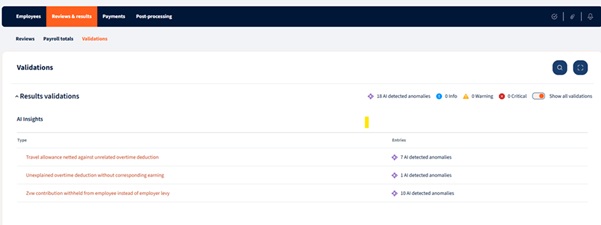
Configuration within PAC for AI Validation rules:
Settings -> Payroll Settings -> AI Validation

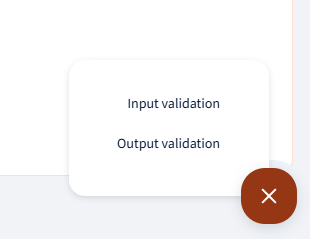
User can click on the add button and select Input or Output validation for new rules to be added:
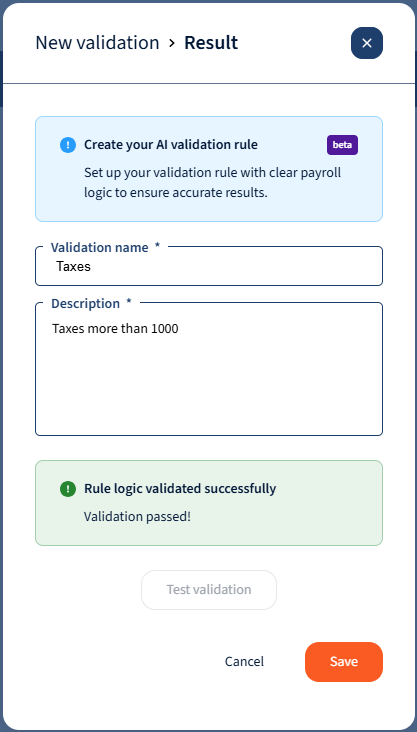
Once selected the user will be required to enter a Validation name and Description.
The description is the instruction provided to the AI Agent, and there is a validation that takes place to verify whether the description/rule is validated as a valid rule and can be used to validate the payroll data.
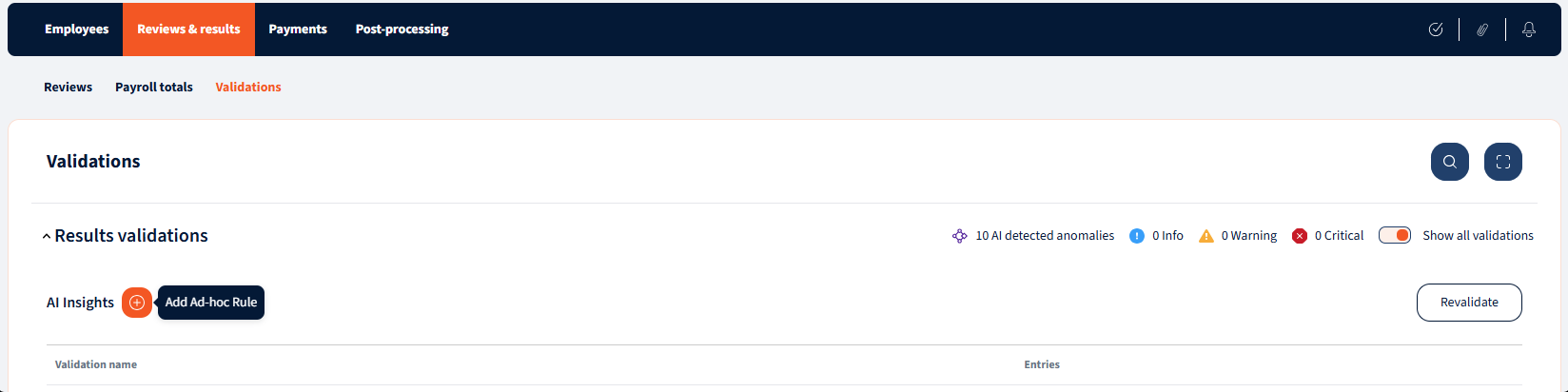
Users will also be able to add ad-hoc rules when they are in the process of processing the payroll:
Once the rules have been added, the system will now validate payroll data as well as provide recommended actions to resolve any discrepancies found by the AI Agent

Lets have a look in HRBlizz:
Some examples of custom validation that can be added:
| Rule | Comment |
|---|---|
| Net Pay less than threshold | Identify all employees whose net pay is less than X |
| Net Pay more than threshold | Identify all employees whose net pay is more than X |
| Gross Pay less than threshold | Identify all employees whose gross pay is less than X |
| Gross Pay more than threshold | Identify all employees whose gross pay is more than X |
| Wage type value less than threshold | Identify all employees with Y wage type value less than X |
| Wage type value more than threshold | Identify all employees with Y wage type value more than X |
| Zero-paid employees | Identify all employees with net pay equal to zero |
| Negative Net Pay employees | Identify all employees with negative net pay |
| Post-termination payments | Identify all employees whose last day of work was before current payroll period and are included in the current payroll |
| Starters | Identify all employees whose first day of work is during the current payroll period |
| Leavers | Identify all employees whose last day of work is during the current payroll period |
| Retro & Arrears Payments | Identify all employees with retro or arrears payments or deductions |
| Duplicate Employees | Identify all employees with duplicate employee IDs |
| Wage Type value anomaly | Identify all wage type values that that deviate significantly from the expected wage type values based on the current payroll calculations using low/medium/high sensitivity. |
| End-of-Service Calculation validation | Verify that the end-of-service calculations meet the minimum amounts defined in the labor law |
| Active employees not in payroll | Identify all active employees who are not included in the current payroll run |
Some preset Validations available to make use of :
| Transaction amount is outside the configured range |
|---|
| Non-positive amount |
| Required transaction is missing or zero |
| Transaction should not be present |
| Transaction amount is outside the usual historical range |
| Recurring transaction missing this period |
| Transaction amount is outside the configured threshold |
| Sharp spike/drop vs history |
| Duplicate transactions |
| New transaction vs history |
| Output validation rules |
Important Note
- Even as we incorporate stringent best practices in AI development—including compliance with regulatory requirements for high-risk systems (such as those in the EU AI Act) and fundamental product design principles focused on security, automation, and purpose-built architecture—we firmly assert that human involvement remains a vital component of the payroll processing function.

We’re glad. Tell us how this page helped.

We’re sorry. Can you tell us what didn’t work for you?
Newsletter
Simplifying employment tasks worldwide.
Let us help you make sure you’re on the right track. Join 15,000+ subscribers and receive exclusive tips and resources.