






 Login
Login Home → Learn & Support → Settings →

Pay Groups
Introduction to Pay Groups
The Pay Groups module, located within PAC Settings, provides a centralized framework for organizing employees into distinct cohorts for payroll processing. To ensure data integrity and prevent administrative gaps, the system utilizes a Default Pay Group logic. This system-generated group is automatically assigned to all entities, effectively eliminating the risk of “ungrouped” employees across the organization.
The module’s primary objective is to empower administrators to create, configure, and manage these groups, facilitating the efficient allocation of employees to specific payment periodicities and configurations.
Access Control and Permissions
System capabilities within the Pay Groups module are strictly governed by role-based access control (RBAC). The following table defines the specific permissions required for various management tasks:
| Role Permission | Functional Capability |
| ROLE_CONFIGURATION_VIEW | Grants the ability to view the pay groups listing and side-drawer configurations. |
| ROLE_CONFIGURATION_EDIT | Grants administrative rights to add, edit, and delete pay groups. |
| ROLE_MANAGER | Allows the user to change an individual employee’s pay group assignment within the PAC Employees listing. |
To access the module, follow the navigation path: Settings -> Main Settings -> Pay Groups.
The primary Pay Groups view provides a high-level summary of all configured groups. The table includes the following data points:
- Number: The ordinal position of the group.
- Pay group code: The unique system identifier.
- Pay group name: The descriptive title of the group.
- Periodicity: The frequency of the payment cycle (e.g., Monthly, Weekly).
- Period: The specific period configuration currently associated with the group.
- Employees: The employee icons assigned to the pay group.

Creating new Pay Groups:
Authorized users can initiate the creation of a new pay group by clicking the “+” button. The process is divided into two distinct steps:
Step 1: Group Configuration
- Pay Group Name: A descriptive label for the group.
- Code: A unique alphanumeric identifier.
- Payment Periodicity: Assignment to a specific frequency. This is critical in environments utilizing multiple periodicities.
- Period Configuration: Assignment to an available period configuration (if not previously allocated).
Step 2: Employee Assignment Upon clicking “Continue,” the interface transitions to the second view of the creation modal, where the user is prompted to assign employees to the newly formed group.

Managing Pay Group Employees
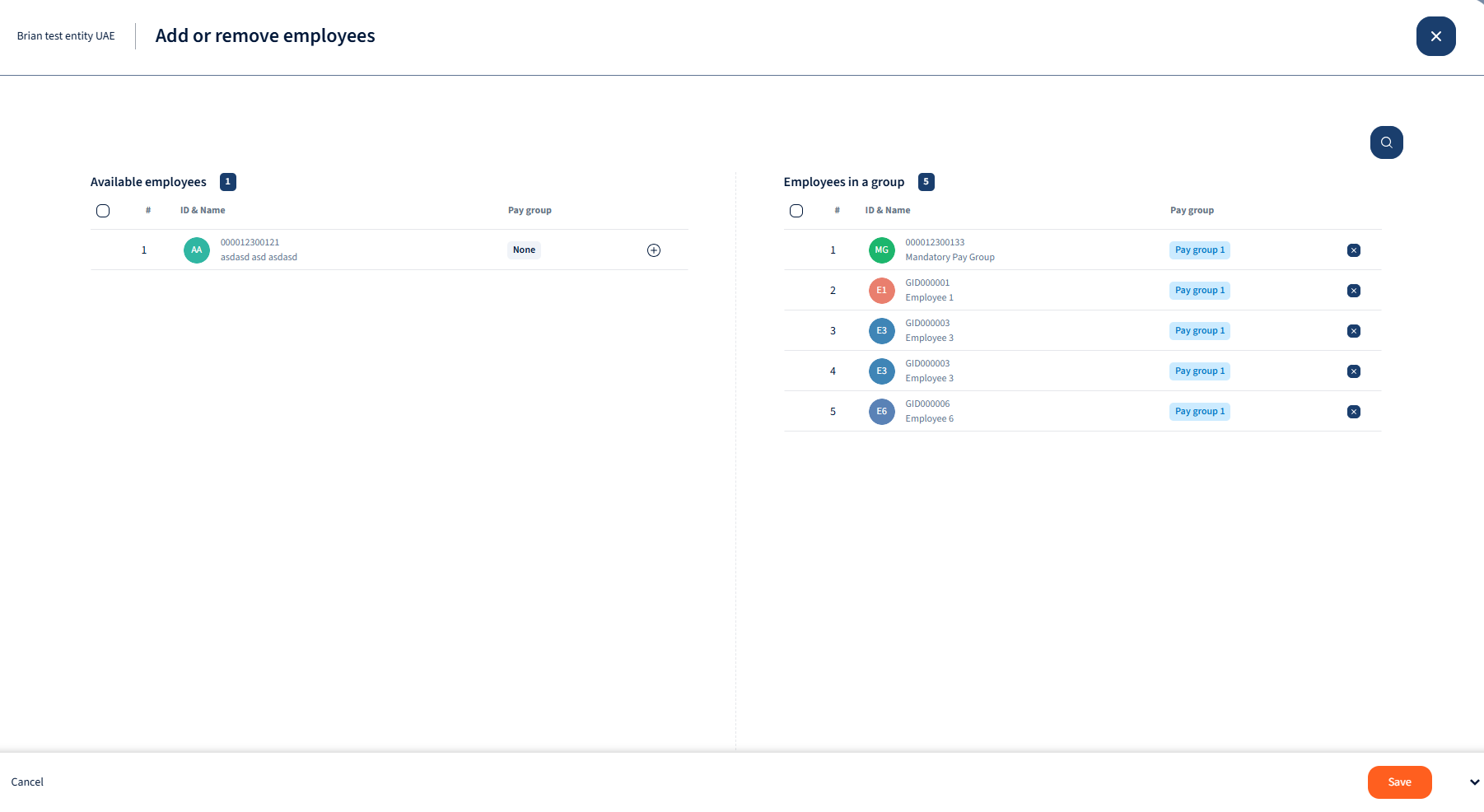
Employee allocation is managed through a comprehensive two-section interface. This interface is accessible both during initial group creation and during subsequent edits.
The Employee Modal Structure
The modal organizes employees into two columns, each displaying a total Employee Count at the top:
- Available Employees: Lists employees who are currently not assigned to any pay group.
- Employees in Group: Lists current members of the group being managed.
Within both columns, the following data is displayed for each employee:
- Ordinal
- Id & Name
- Position
- Added date
Bulk Actions and Search
- Search Functionality: Users can search for specific employees in either list using Name or ID via the integrated search bar.
- Individual Movement: Click the icon next to an employee line to add (left column) or remove (right column) them.
- Bulk Selection: Users may select multiple employees using the bulk selection checkbox.
- Technical Constraint: If the bulk selection checkbox is toggled in one column, the opposite column will be automatically disabled to prevent conflicting data operations.
Saving: Clicking “Save” applies all changes and closes the modal
Editing Existing Pay Groups
Clicking an entry in the Pay Groups listing opens a side drawer for modification. This view provides access to group metadata and the Activity Log, which specifically tracks all historical modifications to the group’s Name and Code.
[!WARNING] Critical Configuration Constraints
- Metadata Edits: The Pay Group Name and Code can be edited at any time.
- Temporal Restrictions: The Periodicity and Period Configuration can only be modified if the group is not currently attached to an active or generated payroll cycle.
Employee List: Use the side drawer to add or remove members following the same rules defined in Section 5.

Employee-Level Management in PAC Settings
Individual pay group assignments can be handled directly within the PAC Employees listing.
- Filtering: The employee list includes a “Pay group” column if the user adds it from column mangement. Users can filter by specific groups or filter for ungrouped employees by selecting the “None” option in the Pay Group filter dropdown.
- Update Methods:
- Employee Profile/Card: Administrators can select a new group from the dropdown in the employee header. A confirmation modal is required to finalize the change.
- PAC Employees Listing: Users with ROLE_MANAGER can update assignments directly from the table view.
The Tooltip Rule: Pay group changes are subject to strict temporal constraints. A group assignment can only be modified when the period is closed OR all payrolls for that group are in the “input processing” step. If these conditions are not met, the system displays a tooltip: “Pay group can be changed after the period is closed or while payrolls are in input processing.”
Deleting Pay Groups
Users with ROLE_CONFIGURATION_EDIT permissions may delete a pay group via the “Delete group” action within the group details.
[!WARNING] System Validations (Hard Stops) The system will forbid the deletion and display a warning if any of the following “Hard Stop” conditions are present:
- Group Membership: The pay group currently contains employees. All employees must be reassigned before the group can be purged.
- Active Payroll: The group is currently attached to an active periodic payroll run

We’re glad. Tell us how this page helped.

We’re sorry. Can you tell us what didn’t work for you?
Newsletter
Simplifying employment tasks worldwide.
Let us help you make sure you’re on the right track. Join 15,000+ subscribers and receive exclusive tips and resources.